
Website Maintenance Services Explained: What Are You Actually Paying For?
Website maintenance services can sound vague until you understand what is actually included. You are not just paying someone to “keep an eye on the website”. You are paying for regular updates, security checks, backups, testing, support and the small ongoing improvements that help your website stay reliable.
The value is often in the problems prevented before they reach your customers.
Website maintenance services protect the website you already invested in.
A website is not finished the day it goes live. It depends on software, hosting, plugins, forms, tracking, security settings and content that all need to keep working together. Without regular attention, small issues can build up quietly until they start affecting enquiries, trust, sales or search visibility.
Consistency is where the real value is.
The cheapest way to look at maintenance is to think of it as a list of tasks. Updates. Backups. Security. Testing. But the real value is not just the checklist. It is having someone regularly look at your website with enough experience to notice what matters, what can wait and what needs to be fixed before it causes a problem.
Without a support plan, website issues often sit between the business owner, the hosting company and whoever built the site originally. A care plan gives the website a clear point of responsibility.
A broken button, outdated plugin, missing image or slow page is much easier to fix when it is found early. Left alone, small issues can become harder and more expensive to solve.
Maintenance should not only stop problems. It should also help the website stay accurate, useful and aligned with the business as services, offers, content and customer expectations change.
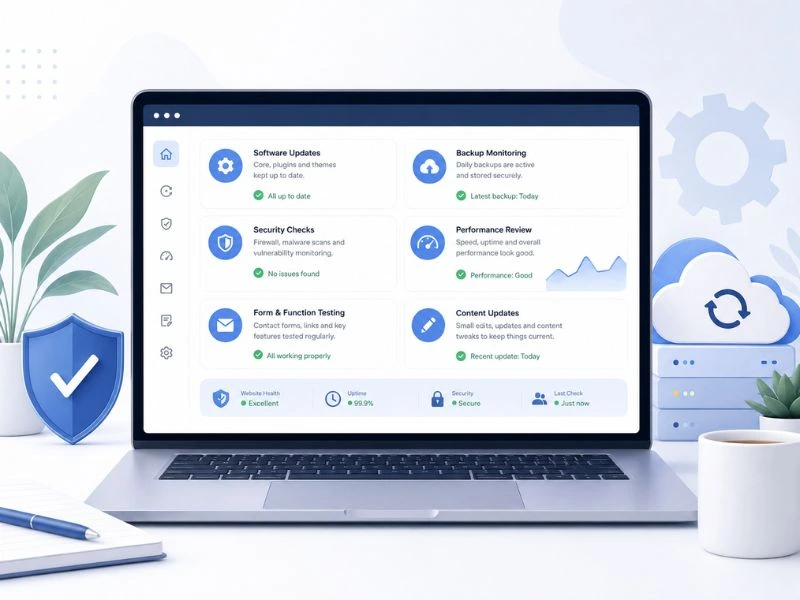
What website maintenance services usually include.
A good care plan should cover the practical things that keep your website safe, functional and useful. The exact work depends on the website, but these are the areas most business owners should expect to see included.
Why the cheapest option can cost more later.
There is a difference between basic maintenance and proper website support. If a plan only includes automatic updates with no real checking, testing or advice, it may look affordable but still leave the business exposed.
This usually covers simple updates and maybe backups. It can be useful for very small websites, but it may not include enough attention to catch business-critical issues.
- Plugin updates may be automated
- Limited testing after changes
- Little or no content support
- Problems may only be handled after they are noticed
This looks at the website as a working business asset. It includes technical checks, user journey checks and practical support so the site keeps serving the business.
- Updates handled with care
- Forms, buttons and key pages checked
- Security and backup process reviewed
- Advice given when something needs attention
What you are really paying for each month.
Business owners often ask why website support is charged monthly. The answer is simple: the work is ongoing because the website environment keeps changing. Software changes, plugins change, browsers change, search expectations change and your business changes too.
If your website uses WordPress, updates are part of keeping the platform current. You can read the official WordPress update guide for more background.
You get someone who can tell you what matters, what does not and what should be handled first. That is often more useful than a generic checklist.
Plugin conflicts, layout issues, update problems and hosting-related questions are easier to handle with proper support.
Small improvements over time can keep the website faster, cleaner and more useful than one that is only touched every few years.
Sometimes the most valuable part is simply having someone to ask before making a risky change or ignoring an important warning.
How regular care supports SEO and performance.
SEO does not only depend on keywords and content. It also depends on whether your website is fast, accessible, secure, mobile-friendly and easy for people to use. A poorly maintained website can make it harder to turn search visibility into enquiries.
Broken pages, missing images, failed forms and dead links can all weaken the user experience and create unnecessary friction.
Images, scripts and plugins can slow a website over time. Regular checks help keep performance from drifting too far.
Service pages, contact details, calls to action and business information should stay accurate as your company changes.
A cleaner technical foundation makes it easier to improve search visibility through proper SEO work.
Google’s Search Central documentation explains that SEO best practices help search engines crawl, index and understand content. A maintained website gives those improvements a stronger foundation to work from. You can explore the Google Search Central documentation for more background.
What a monthly care plan usually does not cover.
It is also important to be clear about what a monthly support plan is not. Maintenance keeps the website healthy and helps with small improvements, but it is not always the same as a full rebuild, major redesign or large marketing campaign.
How to choose website maintenance services that are actually worth it.
A good plan should be easy to understand. You should know what is included, how often checks happen, what counts as small support and what happens if a bigger issue is discovered.
Do not only ask how much it costs. Ask what gets reviewed each month and whether important features like contact forms, backups and updates are actually checked.
- Are backups tested or only assumed?
- Are updates reviewed after completion?
- Are forms and buttons tested?
- Are security warnings monitored?
Maintenance should make life easier for the business owner. You should know how to request small changes, how urgent problems are handled and who is responsible.
- Is there a clear contact point?
- Are small content changes included?
- Will you be told when something needs attention?
- Is the advice practical and understandable?
Need someone to look after your site properly?
We help businesses keep their websites secure, updated and working properly with practical ongoing support. If you are not sure whether your site is being maintained correctly, we can review it and explain what needs attention in plain English.
Website maintenance services FAQs.
Common questions business owners ask before choosing ongoing website support.
What are website maintenance services?
Website maintenance services are ongoing support tasks that help keep a website secure, updated, backed up, fast and working correctly. They can include software updates, security checks, backup monitoring, form testing, speed reviews and small content changes.
What am I actually paying for each month?
You are paying for regular attention, technical checks, support and prevention. A good plan helps catch small problems early, keeps the website healthier and gives you someone to contact when something needs changing or checking.
Do WordPress websites need monthly support?
Most WordPress websites benefit from regular support because WordPress, plugins and themes change over time. Updates need to be managed carefully, and important features should be checked after changes are made.
Is website maintenance the same as hosting?
No. Hosting is where your website lives. Maintenance is the ongoing work that keeps the website updated, secure, backed up, tested and supported. Some hosting providers include limited technical tools, but that is not the same as hands-on website care.
Can maintenance improve website performance?
Yes. Regular checks can help identify slow pages, heavy images, plugin issues and other performance problems. Maintenance will not replace a full optimisation project, but it can help prevent performance from slowly getting worse.
When do I need a redesign instead of maintenance?
If the website is structurally outdated, difficult to use, visually weak or no longer matches your business, maintenance may not be enough. In that case, a redesign may be the better long-term solution.